The private AI photo memory app — turn photos into narrated stories, on your phone

🔒 100% On-Device AI — Never uploaded, never shared

Watch your memories bloom.

You have thousands of photos. But the stories behind them — what you felt, who you were with, what made it special — fade. MemoBloom turns photos into warm, narrated memories you can search and revisit.
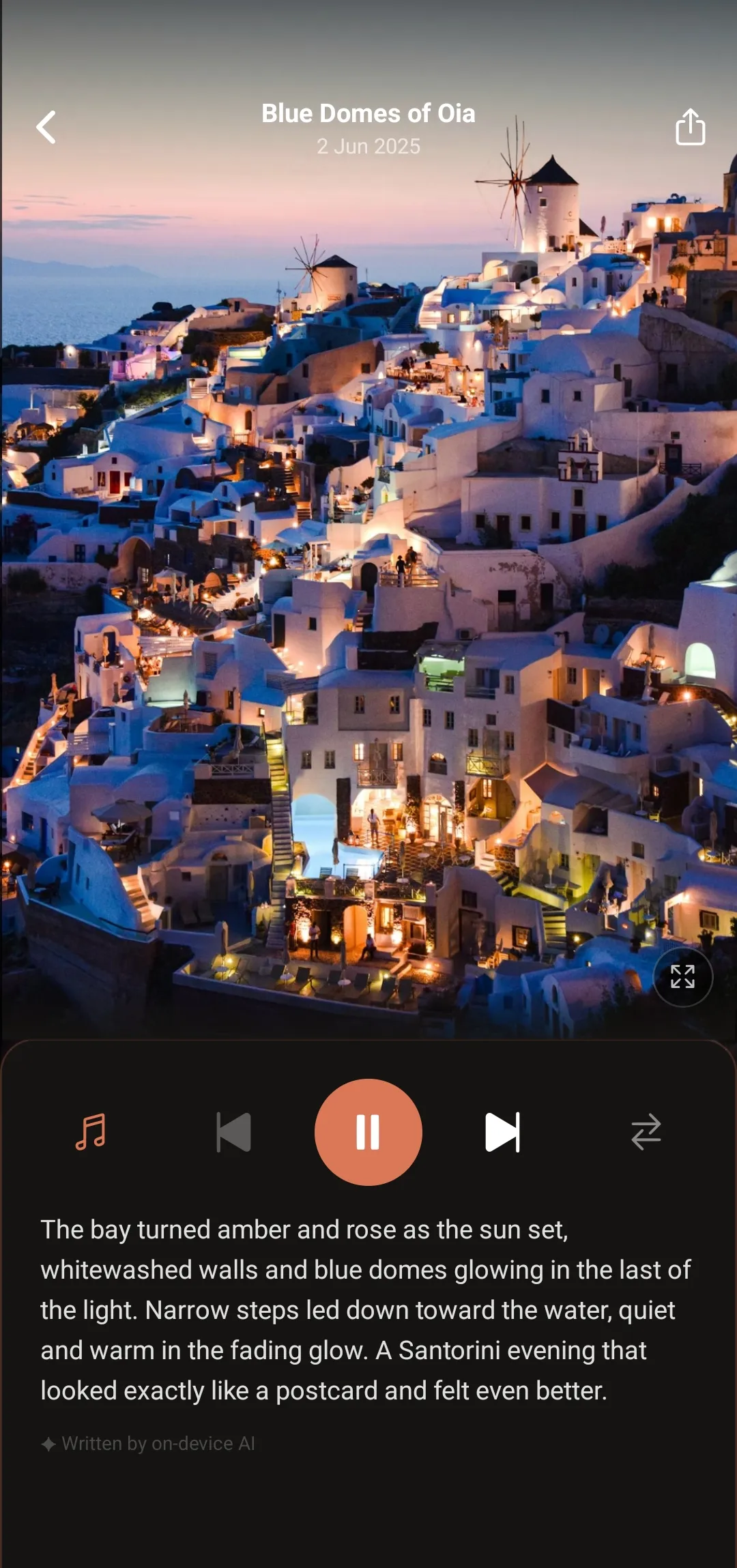
MemoBloom app showing a narrated memory of Santorini at sunset

No account. No cloud. No tracking. Your photos stay on your phone — always.

As seen on
What it does

Memories, not just photos — from your private photo app.

Pick a set of photos. On-device AI reads them, writes a personal narrative, and plays it back as an animated slideshow — or a shareable Memory Film.

✍️

AI Narratives

On-device AI reads your photos and writes a warm, personal story — no templates, no generic captions.

🎬

Memory Films

Turn any memory into a cinematic video — your photos, story, music, and motion. Save it or share it anywhere.

🔍

Semantic Search

Search "birthday at the beach" and AI finds the closest match. No folders, no endless scrolling.

📅

On This Day

A daily reminder of where you were exactly a year ago. No algorithm, no ads — just your own memories.

🧹

Free Up Space

Create a memory, then safely delete the originals. Your story is preserved. Your storage is clear.

Highlights

Memory of the Week, flashbacks, milestone moments — MemoBloom surfaces memories you'd otherwise forget.

🎵

Slideshow & Music

Relive each memory in-app with five cinematic transitions, Ken Burns motion, and background music.

🌗

Dark & Light Mode

Choose light, dark, or follow your system setting. MemoBloom looks great either way.

Who it's for

Made for the moments that matter.

From everyday snapshots to milestone events — MemoBloom turns any set of photos into a story worth keeping.

📦

Free up your camera roll

Your photos deserve a story, not just a folder.

Baby's first year Holiday trips Birthday parties Pet moments
🔄

Document a transformation

Every change tells a story worth keeping.

Home renovation Fitness journey Garden diary
🎨

Capture a creative process

Remember the story behind the work.

Interior design Food content Artist process
👥

Preserve shared moments

The moments that matter most.

Birthdays & celebrations Weddings & anniversaries Kids' school memories Sports season
How it works

Three steps to a beautiful memory.

1

Pick your photos

Select any group of photos from your camera roll — a trip, a birthday, an ordinary Tuesday.

2

AI writes the story

Add a note in your own words, or leave it blank — on-device AI crafts a warm story from your photos. Entirely on your phone.

3

Watch it bloom

Your memory plays as a beautiful animated slideshow — export it as a Memory Film to keep and share.

Pricing

Free to start.

Pro unlocks unlimited memories and everything else. Or own it forever with a one-time Lifetime purchase — early member pricing while it lasts.

Free
$0

Forever free, no credit card

  • Up to 10 memories
  • Full AI narrative & slideshow
  • Memory Films (with watermark)
  • Semantic search
  • On This Day (teaser)
  • 100% on-device, always private
Download free
Pro — Founding Offer
$2.49/mo

or $11.99/yr · price locked for early adopters
Prices may vary by platform and region.

  • Unlimited memories
  • Clean Memory Films (no watermark)
  • Full music library
  • Cinematic transitions
  • On This Day — full reel
  • Time Capsule
Get Pro
EARLY MEMBER PRICE Lifetime
$39.99 one-time

Preserve your memories forever · no recurring fees
Early member price — will increase as the app grows.

  • Everything in Pro, forever
  • Unlimited memories
  • Clean Memory Films (no watermark)
  • Full music library
  • Cinematic transitions
  • On This Day — full reel
  • Time Capsule
Preserve Your Memories Forever
FAQ

Common questions.

Does the AI see my private photos?
The AI runs entirely on your device. Your photos never leave your phone — not to our servers, not anywhere.
Does MemoBloom work without internet?
Yes. Once the app is set up, everything works offline. The only network calls are for model updates and in-app purchases.
Does MemoBloom store or upload my photos anywhere?
No. Photos stay in your phone's storage. MemoBloom reads them locally and never transmits them.
What data does MemoBloom collect about me?
Only anonymous crash reports and purchase receipts (via RevenueCat). No photos, no narrative text, no personal data.
How long does it take to create a memory?
Typically 1–3 minutes for a set of 5–10 photos, depending on your device. The AI processes each photo on-device.
How many photos can I add to one memory?
Between 3 and 15 photos per memory.
Can I edit the AI-generated story?
You can write a full note before processing — the AI uses it as-is, or you can write a short note and the AI weaves it into the narrative alongside your photos.
Can I share a memory with someone else?
Yes. Export your memory as a Memory Film — a video with your photos, story, music, and cinematic motion — and share it anywhere. You can also save a memory card image (JPG) to your camera roll.
What happens to my memories if I delete the app?
Memories are stored locally. If iCloud or Google backup is enabled, your memories should restore when you reinstall — though AI models (~1 GB) will need to re-download on first launch. Without backup, deleting the app removes your memories permanently.
Will it slow down my phone?
AI processing runs in the background while creating a memory and uses significant CPU briefly. Normal app use is lightweight.
Does it work on both iPhone and Android?
Yes. MemoBloom is available on iOS 16.4+ and Android 8.0+.
What can I do for free?
Create up to 10 memories with full AI narration, semantic search, slideshow, and Memory Films (with a small watermark) — free forever, no credit card needed.
What does Pro include?
Unlimited memories, clean Memory Films with no watermark, the full music library, cinematic transitions, full On This Day reel, and Time Capsule.
Can I cancel my subscription anytime?
Yes. Cancel anytime from the App Store or Google Play. You keep Pro access until the end of your billing period.
How is MemoBloom different from Google Photos or iCloud?
Google Photos and iCloud store and sync your photos to the cloud. MemoBloom keeps everything on-device and adds a personal AI-written story to each memory — no cloud, no account, no algorithm. Read our full comparison of private photo apps for more.
How is MemoBloom different from a regular photo album app?
Photo albums organise photos. MemoBloom turns them into a narrated story with an animated slideshow — the context, not just the image.